
Exam CKS Topic 1 Question 53 Discussion
Actual exam question for Linux Foundation's CKS exam
Question #: 53
Topic #: 1
Question #: 53
Topic #: 1
You are tasked with hardening a Kubernetes cluster to meet the requirements of the CIS Kubernetes Bencnmark. One of the key areas is to implement proper access control and authentication. You need to create a strong authentication mechanism that uses client certificates for authentication, while also using RBAC to define specific roles and permissions for different users.
How would you set up a strong authentication mechanism using client certificates for authentication and configure R8AC to define specific roles and permissions for different users, to comply With the CIS Kubernetes Benchmark?
How would you set up a strong authentication mechanism using client certificates for authentication and configure R8AC to define specific roles and permissions for different users, to comply With the CIS Kubernetes Benchmark?
Suggested Answer:
Solution (Step by Step) :
1. Generate Client Certificates:
- use a tool like 'ctssr to generate client certificates for each user who needs access to the cluster.
- Create a separate certificate authority (CA) to issue these Client certificates.
- For each user, create a certificate signing request (CSR) and use the CA to sign the CSR to generate the client certificate and private key.
2. Configure Kubernetes API Server:
- Modify the Kubernetes API server configuration (e.g., '/etc/kubernetes/manifests/kube-apiserver.yaml') to enable client certificate authentication:
- Set '--client-ca-file' to the path of the CA certificate.
- Set '--tls-cen-file' to the path of the API server certificate.
- Set '--tls-private-key-files to the path of the API server private key.
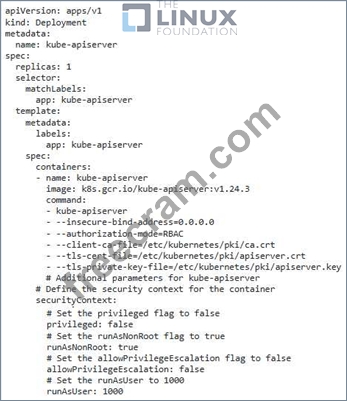
3. Define RBAC Roles: - Use 'kubectr to create RBAC roles for different user groups. - Define roles that map to specific permissions. For example. - 'admin': Full access to the cluster - 'developers: Ability to create and manage resources, but not access sensitive information. - 'viewer': Only able to view resources.

4. Bind Roles to Users: - Create RoleBindings that link the roles to the users who need access to them. - Use the client certificate and private key to authenticate as the user and bind the appropriate role. - You can bind roles to users individually or to groups. 5. Configure 'kubectr' - Configure the 'kubectr command-line tool to use client certificates for authentication. - Set the 'KI-IBECONFIG' environment variable to point to a file containing the client certificate and private key. - Run 'kubectl config set-credentials -client-key -client-certificate to configure the user with the certificate. 6. Verify Configuration: - Test that the configuration works by logging in as different users and verifying that they have the expected permissions.
1. Generate Client Certificates:
- use a tool like 'ctssr to generate client certificates for each user who needs access to the cluster.
- Create a separate certificate authority (CA) to issue these Client certificates.
- For each user, create a certificate signing request (CSR) and use the CA to sign the CSR to generate the client certificate and private key.
2. Configure Kubernetes API Server:
- Modify the Kubernetes API server configuration (e.g., '/etc/kubernetes/manifests/kube-apiserver.yaml') to enable client certificate authentication:
- Set '--client-ca-file' to the path of the CA certificate.
- Set '--tls-cen-file' to the path of the API server certificate.
- Set '--tls-private-key-files to the path of the API server private key.
3. Define RBAC Roles: - Use 'kubectr to create RBAC roles for different user groups. - Define roles that map to specific permissions. For example. - 'admin': Full access to the cluster - 'developers: Ability to create and manage resources, but not access sensitive information. - 'viewer': Only able to view resources.
4. Bind Roles to Users: - Create RoleBindings that link the roles to the users who need access to them. - Use the client certificate and private key to authenticate as the user and bind the appropriate role. - You can bind roles to users individually or to groups. 5. Configure 'kubectr' - Configure the 'kubectr command-line tool to use client certificates for authentication. - Set the 'KI-IBECONFIG' environment variable to point to a file containing the client certificate and private key. - Run 'kubectl config set-credentials -client-key -client-certificate to configure the user with the certificate. 6. Verify Configuration: - Test that the configuration works by logging in as different users and verifying that they have the expected permissions.
by Lennon at Aug 26, 2026, 12:19 AM
0
0
0
10
Comments
Upvoting a comment with a selected answer will also increase the vote count towards that answer by one. So if you see a comment that you already agree with, you can upvote it instead of posting a new comment.
Report Comment
Commenting
You can sign-up / login (it's free).