

[Aug 03, 2026] Updates Up to 365 days On Valid CloudSec-Pro Braindumps
Best QualityCloudSec-Pro Exam Questions Palo Alto Networks Test To Gain Brilliante Result
Palo Alto Networks CloudSec-Pro Exam Syllabus Topics:
| Topic | Details |
|---|---|
| Topic 1 |
|
| Topic 2 |
|
| Topic 3 |
|
| Topic 4 |
|
| Topic 5 |
|
NEW QUESTION # 79
In WAAS Access control file upload controls, which three file types are supported out of the box?
(Choose three.)
- A. Journal
- B. Text
- C. Audio
- D. Images
- E. Documents
Answer: B,D,E
Explanation:
In WAAS Access control for file uploads, Prisma Cloud supports various file types out-of-the-box to ensure secure and controlled file upload functionality. The supported file types include Text, Images, and Documents. These categories cover a wide range of commonly used file formats, allowing organizations to manage and restrict file uploads based on the content type. This feature helps in preventing malicious file uploads and ensures that only approved file types are uploaded to applications and services.
NEW QUESTION # 80
The compliance team needs to associate Prisma Cloud policies with compliance frameworks. Which option should the team select to perform this task?
- A. Compliance
- B. Policies
- C. Custom Compliance
- D. Alert Rules
Answer: C
Explanation:
1) Select Policies 2) Select the policy rule to edit, on 3 Compliance Standards click + and associate the policy with the compliance standard (https://docs.paloaltonetworks.com/prisma/prisma-cloud/prisma-cloud-admin
/prisma-cloud-compliance/create-a-custom-compliance-standard)
NEW QUESTION # 81
Which two services require external notifications to be enabled for policy violations in the Prisma Cloud environment? (Choose two.)
- A. QROC
- B. SQS
- C. Splunk
- D. Email
Answer: B,C
Explanation:
https://docs.paloaltonetworks.com/prisma/prisma-cloud/prisma-cloud-admin/configure-external-integrations- on-prisma-cloud#id24911ff9-c9ec-4503-bb3a-6cfce792a70d
NEW QUESTION # 82
You have onboarded a public cloud account into Prisma Cloud Enterprise. Configuration Resource ingestion is visible in the Asset Inventory for the onboarded account, but no alerts are being generated for the configuration assets in the account.
Config policies are enabled in the Prisma Cloud Enterprise tenant, with those policies associated to existing alert rules. ROL statements on the investigate matching those policies return config resource results successfully.
Why are no alerts being generated?
- A. The public cloud account is not associated with an alert notification.
- B. The public cloud account does not have audit trail ingestion enabled.
- C. The public cloud account does not access to configuration resources.
- D. The public cloud account is not associated with an alert rule.
Answer: D
Explanation:
In Prisma Cloud Enterprise, for alerts to be generated for configuration assets in an onboarded public cloud account, it is essential that the account is associated with an alert rule that matches the enabled config policies. If the account is not linked to an alert rule or if the existing alert rules do not match the config policies, no alerts will be generated even though configuration resource ingestion is visible, and RQL statements return config resource results. This requirement emphasizes the need for a well-structured alerting mechanism to ensure that security incidents are promptly identified and addressed.
NEW QUESTION # 83
Based on the "Path to Runtime" tab within Application Security Posture Management (ASPM), how are ingested code repositories associated with deployed cloud assets?
- A. By creating custom networking in the cloud service provider (CSP)
- B. By applying infrastructure as code (IaC) tags
- C. By enabling the Cortex Cloud DevSecOps bot
- D. By directly linking through the Network Transporter
Answer: C
Explanation:
The Cortex Cloud DevSecOps bot enables the association between ingested code repositories and deployed cloud assets by connecting development pipeline activity and repository context to runtime resources within the Path to Runtime view.
NEW QUESTION # 84
What will happen when a Prisma Cloud Administrator has configured agentless scanning in an environment that also has Host and Container Defenders deployed?
- A. Defender scans will automatically be disabled, so agentless scans are the only scans occurring.
- B. Agentless scans do not conflict with Defender scans, so both will run.
- C. Agentless scan will automatically be disabled, so Defender scans are the only scans occurring.
- D. Both agentless and Defender scans will be disabled and an error message will be received.
Answer: B
Explanation:
In a Prisma Cloud environment where both agentless scanning and Defender-based scans (Host and Container Defenders) are configured, there is no inherent conflict between these two scanning methods. Both agentless scans and Defender scans are designed to complement each other, providing comprehensive coverage and depth in the security analysis of the environment.
Agentless scans offer a broad, less intrusive overview, while Defender scans provide deep, detailed insights into the security posture. Therefore, both types of scans will run concurrently, enhancing the overall security visibility and protection of the environment without disabling or interfering with each other's operations.
The agentless scanning architecture lets you inspect a host and the container images in that host without having to install an agent or affecting its execution.
NEW QUESTION # 85
Which report includes an executive summary and a list of policy violations, including a page with details for each policy?
- A. Business Unit
- B. Cloud Security Assessment
- C. Compliance Standard
- D. Detailed
Answer: B
Explanation:
The Cloud Security Assessment report is a PDF report that summarizes the risks from open alerts in the monitored cloud accounts for a specific cloud type. The report includes an executive summary and a list of policy violations, including a page with details for each policy that includes the description and the compliance standards that are associated with it, the number of resources that passed and failed the check within the specified time period.
The report that includes an executive summary along with a list of policy violations and detailed pages for each policy is the "Cloud Security Assessment" report. This type of report is designed to provide organizations with a comprehensive overview of their cloud security posture, highlighting both compliance with security policies and areas needing attention.
NEW QUESTION # 86
Based on the following information, which RQL query will satisfy the requirement to identify VM hosts deployed to organization public cloud environments exposed to network traffic from the internet and affected by Text4Shell RCE (CVE-2022-42889) vulnerability?
* Network flow logs from all virtual private cloud (VPC) subnets are ingested to the Prisma Cloud Enterprise Edition tenant.
* All virtual machines (VMs) have Prisma Cloud Defender deployed.
A)
B)
C)
D)
- A. Option B
- B. Option D
- C. Option C
- D. Option A
Answer: D
Explanation:
The RQL query in Option A is designed to identify VM hosts that are exposed to internet traffic and are affected by the Text4Shell RCE vulnerability (CVE-2022-42889). This query looks for network flow records with byte transfers indicating activity and filters for resources with host vulnerability findings sourced from
'Prisma Cloud'. It also checks for exposure to suspicious or internet IPs, satisfying the criteria for the given scenario.
NEW QUESTION # 87
Which command should be used in the Prisma Cloud twistcli tool to scan the nginx:latest image for vulnerabilities and compliance issues?
- A. $ twistcli images scan
--address
--user
--password
--details
nginx:latest - B. $ twistcli images scan
--address
--username
--password
--details
nginx:latest - C. $ twistcli images build
--console-address
--user
--password
--details
nginx:latest - D. $ twistcli images scan
--console-address
--user
--password
--output-file scan-results.json
nginx:latest
Answer: A
NEW QUESTION # 88
What type of cloud resources does Prisma Cloud focus on securing?
- A. Only serverless applications
- B. All cloud resources, including workloads, data, and network configurations
- C. Only databases and storage systems
- D. Only virtual machines and containers
Answer: B
Explanation:
Prisma Cloud secures a wide range of cloud resources, including virtual machines, containers, serverless applications, data, network configurations, and more, offering comprehensive security across cloud environments.
NEW QUESTION # 89
The security auditors need to ensure that given compliance checks are being run on the host.
Which option is a valid host compliance policy?
- A. Ensure functions are not overly permissive.
- B. Ensure images are created with a non-root user.
- C. Ensure host devices are not directly exposed to containers.
- D. Ensure compliant Docker daemon configuration.
Answer: D
Explanation:
The question focuses on valid host compliance policies within a cloud environment. Among the given options, the most relevant to host compliance is ensuring compliant Docker daemon configuration. Docker daemon configurations are critical for securing the host environment where containers are run. A compliant Docker daemon configuration involves setting security-related options to ensure the Docker engine operates securely. This can include configurations related to TLS for secure communication, logging levels, authorization plugins, and user namespace remapping for isolation.
Ensuring functions are not overly permissive (Option A) and ensuring images are created with a non- root user (Option C) are more directly related to the security best practices for serverless functions and container images, respectively, rather than host-specific compliance checks.
Ensuring host devices are not directly exposed to containers (Option B) is also important for security, but it falls under the broader category of container runtime security rather than host- specific compliance.
Thus, the most valid host compliance policy from the given options is to ensure a compliant Docker daemon configuration, as it directly impacts the security posture of the host environment in a containerized infrastructure. This aligns with best practices for securing Docker environments and is a common recommendation in container security guidelines, including those from Docker and cybersecurity frameworks.
NEW QUESTION # 90
The Compute Console has recently been upgraded, and the administrator plans to delay upgrading the Defenders and the Twistcli tool until some of the team's resources have been rescaled. The Console is currently one major release ahead. What will happen as a result of the Console upgrade?
- A. Defenders will disconnect, and Twistcli will stop working.
- B. Both Defenders and Twistcli will remain working.
- C. Defenders will remain connected, and Twistcli will stop working.
- D. Defenders will disconnect, and Twistcli will remain working.
Answer: B
Explanation:
When the Compute Console in Prisma Cloud is upgraded to a newer major release, while the Defenders and the Twistcli tool remain on the older version, the system is designed to ensure backward compatibility to a certain extent. As a result, both Defenders and Twistcli will continue to operate despite the version discrepancy. The Defenders will remain connected, continuing their monitoring and protection duties, and the Twistcli tool will keep functioning, allowing for continued scanning and other CLI-based operations. This design ensures that the security and functionality of the environment are not abruptly interrupted due to the upgrade process, providing administrators with a window to plan and execute the upgrade of Defenders and Twistcli without immediate pressure.
NEW QUESTION # 91
Which resources can be added in scope while creating a vulnerability policy for continuous integration?
- A. Images and labels
- B. Images and containers
- C. Images and cluster
- D. Labels and AccountID
Answer: B
Explanation:
When creating a vulnerability policy for continuous integration within Prisma Cloud, the scope of the policy can include specific resources that are critical to the CI/CD pipeline, such as images and containers. These resources are central to the development and deployment processes in containerized environments. By focusing on images and containers, the policy can effectively identify and address vulnerabilities that might be present in container images before they are deployed or in running containers, thereby enhancing the security of the continuous integration and deployment pipeline. This approach ensures that only secure, compliant container images are used in production, reducing the risk of vulnerabilities being exploited.
NEW QUESTION # 92
Which two frequency options are available to create a compliance report within the console? (Choose two.)
- A. Recurring
- B. One-time
- C. Weekly
- D. Monthly
Answer: B,C
Explanation:
Within Prisma Cloud, when creating compliance reports, administrators have the flexibility to schedule the generation of these reports based on their specific needs. The available frequency options include "One-time," where a report is generated once at a specified time, and "Weekly," which allows for the recurring generation of reports on a weekly basis. These options provide organizations with the ability to tailor their compliance reporting to their operational requirements, ensuring that they have regular and up-to-date insights into their compliance posture.
NEW QUESTION # 93
Which two integrations enable ingesting host findings to generate alerts? (Choose two.)
- A. Splunk
- B. JIRA
- C. Tenable
- D. Qualys
Answer: C,D
Explanation:
To ingest host findings and generate alerts in Prisma Cloud, integrations with Tenable (B) and Qualys (D) are supported. These integrations allow Prisma Cloud to ingest vulnerability and compliance data from Tenable and Qualys, which are renowned vulnerability management solutions. By integrating these tools, Prisma Cloud can enhance its visibility into the security posture of hosts within the cloud environment, enabling more comprehensive threat detection and response capabilities. The integration facilitates the aggregation and correlation of findings from these external sources, enriching the overall security intelligence and enabling more informed and timely decision-making regarding threat mitigation and compliance management.
https://docs.paloaltonetworks.com/prisma/prisma-cloud/prisma-cloud-admin/configure-external-integrations- on-prisma-cloud/integrations-feature-support
NEW QUESTION # 94
Which two integrations enable ingesting host findings to generate alerts? (Choose two.)
- A. Splunk
- B. JIRA
- C. Tenable
- D. Qualys
Answer: C,D
Explanation:
To ingest host findings and generate alerts in Prisma Cloud, integrations with Tenable (B) and Qualys (D) are supported. These integrations allow Prisma Cloud to ingest vulnerability and compliance data from Tenable and Qualys, which are renowned vulnerability management solutions. By integrating these tools, Prisma Cloud can enhance its visibility into the security posture of hosts within the cloud environment, enabling more comprehensive threat detection and response capabilities. The integration facilitates the aggregation and correlation of findings from these external sources, enriching the overall security intelligence and enabling more informed and timely decision-making regarding threat mitigation and compliance management.
NEW QUESTION # 95
Given an existing ECS Cluster, which option shows the steps required to install the Console in Amazon ECS?
- A. The console cannot natively run in an ECS cluster. A onebox deployment should be used.
- B. Download and extract the release tarballEnsure that each node has its own storage for Console data Create the Console task definitionDeploy the task definition
- C. Download and extract the release tarball Create an EFS file system and mount to each node in the cluster Create the Console task definition Deploy the task definition
- D. Download and extract release tarball Download task from AWSCreate the Console task definition Deploy the task definition
Answer: C
Explanation:
Reference: https://docs.paloaltonetworks.com/prisma/prisma-cloud/19-11/prisma-cloud-compute-edition- admin/install/install_amazon_ecs.html To install the Console in an Amazon ECS Cluster, the steps involve downloading and extracting the release tarball, which contains the necessary files for the Console. Then, an Amazon Elastic File System (EFS) should be created and mounted to each node in the ECS cluster to provide shared storage for Console data.
Following this, a Console task definition needs to be created in ECS, which defines how the Console container should run. Finally, this task definition is deployed to the ECS cluster to start the Console.
NEW QUESTION # 96
An administrator wants to install the Defenders to a Kubernetes cluster. This cluster is running the console on the default service endpoint and will be exporting to YAML.
Console Address: $CONSOLE_ADDRESS Websocket Address: $WEBSOCKET_ADDRESS User:
$ADMIN_USER
Which command generates the YAML file for Defender install?
- A. <PLATFORM>/twistcli defender YAML kubernetes \--address $CONSOLE_ADDRESS \--user
$ADMIN_USER \--cluster-address $WEBSOCKET_ADDRESS - B. <PLATFORM>/twistcli defender export kubernetes \--address $WEBSOCKET_ADDRESS \--user
$ADMIN_USER \--cluster-address $CONSOLE_ADDRESS - C. <PLATFORM>/twistcli defender export kubernetes \--address $CONSOLE_ADDRESS \--user
$ADMIN_USER \--cluster-address $WEBSOCKET_ADDRESS - D. <PLATFORM>/twistcli defender \--address $CONSOLE_ADDRESS \--user $ADMIN_USER \-- cluster-address $CONSOLE_ADDRESS
Answer: C
Explanation:
The correct command to generate the YAML file for Defender install in a Kubernetes cluster, considering the console and websocket addresses, as well as the admin user, would typically involve specifying the addresses and user details. The option D seems most aligned with standard practices for such commands, where you export the Defender configuration for Kubernetes, specifying the console and websocket addresses along with the user details.
Reference: https://docs.paloaltonetworks.com/prisma/prisma-cloud/prisma-cloud-admin-compute/install/ install_kubernetes.html
NEW QUESTION # 97
Which container scan is constructed correctly?
- A. twistcli images scan -u api -p api --address https://us-west1.cloud.twistlock.com/us-3-123456789 -- container myimage/latest
- B. twistcli images scan -u api -p api --docker-address https://us-west1.cloud.twistlock.com/us-3-
123456789 myimage/latest - C. twistcli images scan --docker-address https://us-west1.cloud.twistlock.com/us-3-123456789 myimage/ latest
- D. twistcli images scan -u api -p api --address https://us-west1.cloud.twistlock.com/us-3-123456789 -- details myimage/latest
Answer: D
Explanation:
The correct construction for a container scan using the TwistCLI tool provided by Prisma Cloud (formerly Twistlock) is shown in option C. This command uses the TwistCLI tool to scan a container image, specifying the necessary authentication credentials (username and password with '-u' and '-p' flags), the address of the Prisma Cloud instance (with the '--address' flag), and the image to be scanned (in this case, 'myimage/latest').
The inclusion of the '--details' flag is a common practice to obtain detailed scan results, which is crucial for in- depth analysis and remediation efforts. This command structure aligns with the standard usage of TwistCLI for image scanning purposes, as documented in Prisma Cloud's official resources and guides.
NEW QUESTION # 98
Put the steps involved to configure and scan using the IntelliJ plugin in the correct order.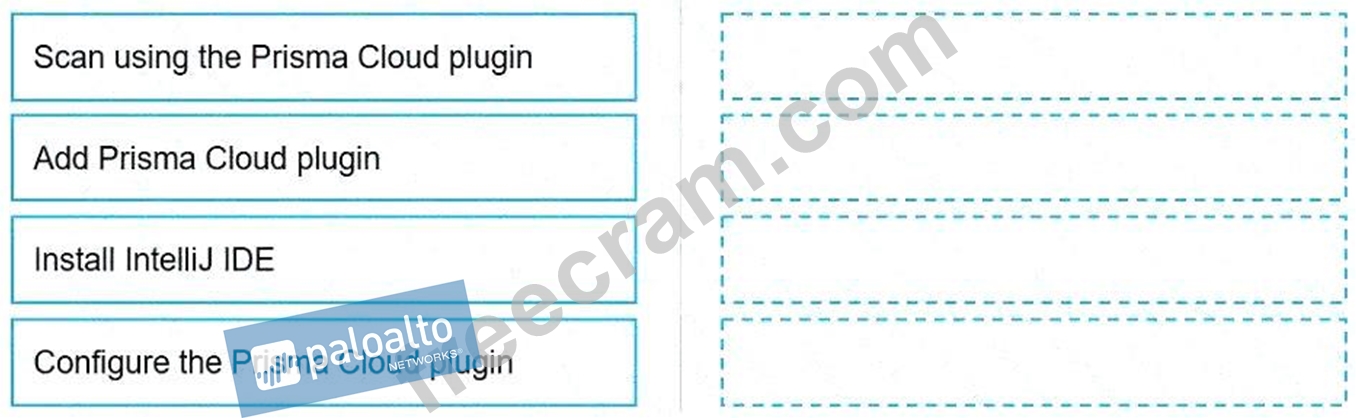
Answer:
Explanation: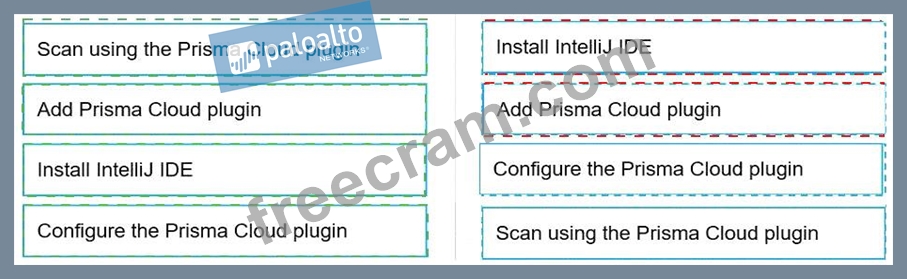
Explanation:
* Install IntelliJ IDE
* Add Prisma Cloud plugin
* Configure the Prisma Cloud plugin
* Scan using the Prisma Cloud plugin
To configure and use the Prisma Cloud plugin for scanning within the IntelliJ Integrated Development Environment (IDE), you must follow a series of steps in a specific order to ensure proper setup and functionality.
Firstly, you need to have the IntelliJ IDE installed on your system. Without the IDE, you cannot add or use the Prisma Cloud plugin, as it is designed to work within this development environment.
Secondly, after installing the IntelliJ IDE, you add the Prisma Cloud plugin. This involves navigating to the plugin marketplace within IntelliJ and selecting the Prisma Cloud plugin for installation.
Once the plugin is added to your IntelliJ IDE, the next step is to configure the Prisma Cloud plugin. This configuration may include setting up your Prisma Cloud credentials, specifying your scan options, and other settings that tailor the plugin's functionality to your needs.
Finally, after the plugin is installed and configured, you can proceed to scan your project using the Prisma Cloud plugin. This will check your code against security policies and compliance standards, providing feedback and recommendations for any identified issues.
Following these steps ensures that the Prisma Cloud plugin is properly integrated into your IntelliJ development workflow, allowing for continuous security and compliance checks as part of the development process.
NEW QUESTION # 99
A user from an organization is unable to log in to Prisma Cloud Console after having logged in the previous day. Which area on the Console will provide input on this issue?
- A. Audit Logs
- B. Access Control
- C. Users & Groups
- D. SSO
Answer: A
Explanation:
In the event a user is unable to log in to the Prisma Cloud Console, Audit Logs serve as a critical area for investigating the issue. Audit Logs provide a detailed record of activities, including login attempts, within the Prisma Cloud environment. By examining the Audit Logs, administrators can identify failed login attempts, understand the reasons behind login failures (e.g., incorrect credentials, account lockouts, or access policy changes), and take appropriate actions to resolve the login issues, ensuring users can access the console as expected.
NEW QUESTION # 100
Which set of steps is the correct process for obtaining Console images for Prisma Cloud Compute Edition?
- A. To retrieve Prisma Cloud Console images using URL authentication:
1. Access registry-url-auth.twistlock.com and authenticate using the user certificate.
2. Retrieve the Prisma Cloud Console images using "docker pull." - B. To retrieve Prisma Cloud Console images using basic authentication:
1. Access registry.paloaltonetworks.com and authenticate using "docker login."
2. Retrieve the Prisma Cloud Console images using "docker pull." - C. To retrieve Prisma Cloud Console images using basic authentication:
1. Access registry.twistlock.com and authenticate using "docker login."
2. Retrieve the Prisma Cloud Console images using "docker pull." - D. To retrieve Prisma Cloud Console images using URL authentication:
1. Access registry-auth.twistlock.com and authenticate using the user certificate.
2. Retrieve the Prisma Cloud Console images using "docker pull."
Answer: B
Explanation:
Prisma Cloud, part of Palo Alto Networks' cloud security suite, offers Console images that can be retrieved for deployment in various environments. The correct process for obtaining these images involves using basic authentication with Docker, a widely-used containerization platform. Users must first access the official Palo Alto Networks registry at registry.paloaltonetworks.com. Here, they are required to authenticate using the "docker login" command, which prompts for credentials. Upon successful authentication, users can then use the "docker pull" command to retrieve the Prisma Cloud Console images. This method ensures secure access to the latest Console images for deployment within an organization's infrastructure, aligning with best practices for container image management and deployment.
NEW QUESTION # 101
Which container scan is constructed correctly?
- A. twistcli images scan -u api -p api --docker-address https://us-west1.cloud.twistlock.com/us-3-
123456789 myimage/latest - B. twistcli images scan -u api -p api --address https://us-west1.cloud.twistlock.com/us-3-123456789 -
-details myimage/latest - C. twistcli images scan --docker-address https://us-west1.cloud.twistlock.com/us-3-123456789 myimage/ latest
- D. twistcli images scan -u api -p api --address https://us-west1.cloud.twistlock.com/us-3-123456789 -
- container myimage/latest
Answer: B
Explanation:
The correct construction for a container scan using the TwistCLI tool provided by Prisma Cloud (formerly Twistlock) is shown in option C. This command uses the TwistCLI tool to scan a container image, specifying the necessary authentication credentials (username and password with '-u' and '-p' flags), the address of the Prisma Cloud instance (with the '--address' flag), and the image to be scanned (in this case, 'myimage/latest'). The inclusion of the '--details' flag is a common practice to obtain detailed scan results, which is crucial for in-depth analysis and remediation efforts. This command structure aligns with the standard usage of TwistCLI for image scanning purposes, as documented in Prisma Cloud's official resources and guides.
NEW QUESTION # 102
......
Focus on CloudSec-Pro All-in-One Exam Guide For Quick Preparation: https://www.freecram.com/Palo-Alto-Networks-certification/CloudSec-Pro-exam-dumps.html
Tested Material Used To CloudSec-Pro: https://drive.google.com/open?id=1T6FrkwQ5mwcGQPUA20YpzXay65p9gvlC